

Conveyer Editor is a tool to define the movement profile of product conveyance per station.
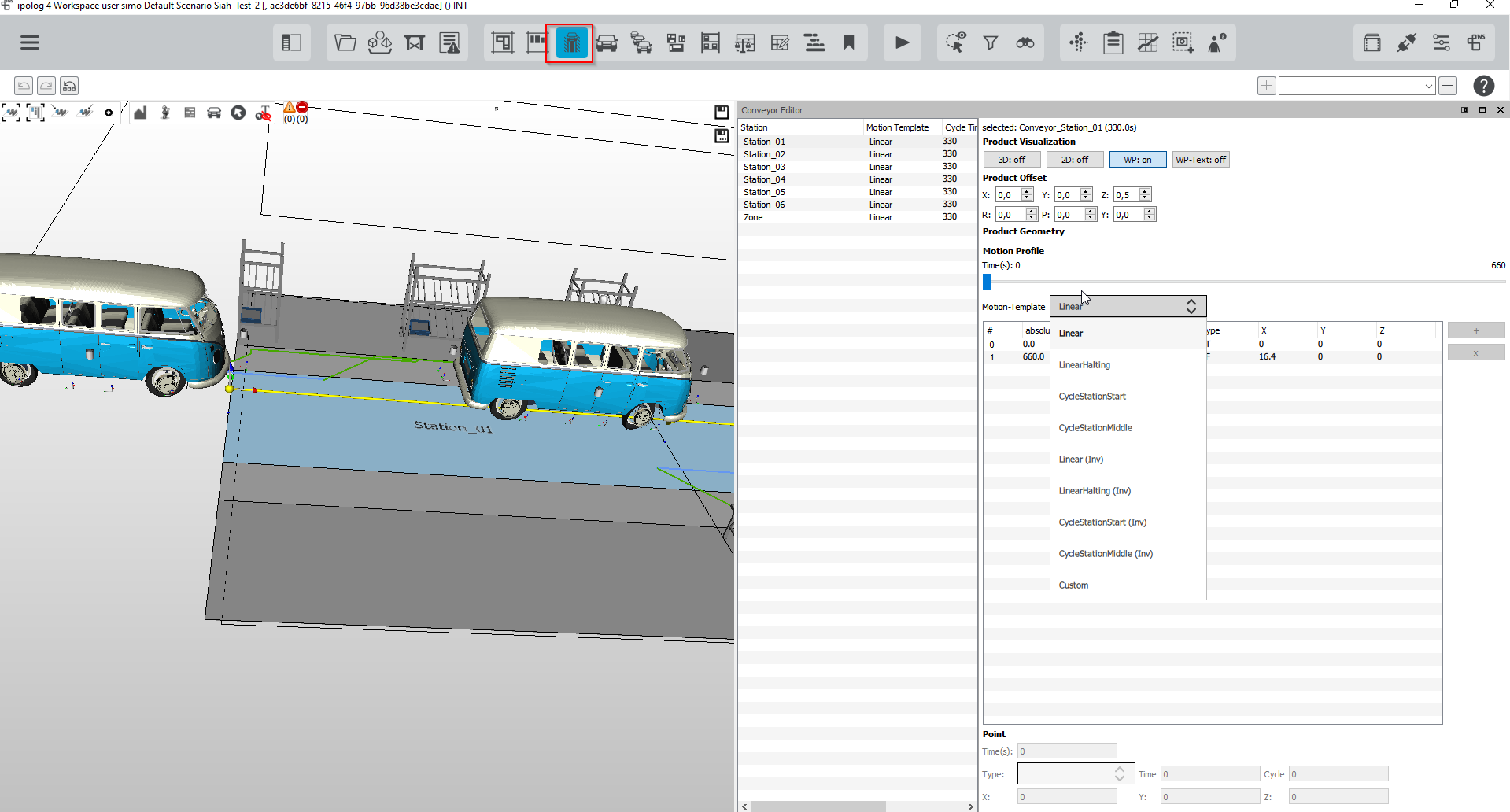
With Multiselect, the settings can be defined for several stations.
Product visualization
- 3D on / off: show or hide products in the 3D scene
- 2D on / off: show or hide blocking/shadow area of the product
- WP on / off: show or hide working points on the product
- WO text on / off: show or hide texts of the working points on the product
Product offset (positioning)
- in x-direction from the coordinate origin of the product
- in y-direction from the coordinate origin of the product
- in z-direction from the coordinate origin of the product
- Rotation and inclination
Motion Profile
- Linear:
- Linear motion over two station lengths and two beats, starting from the station origin, used to simulate across stations.
- LinearHalting
- Linear movement through the station and stops at the end of the station
- CycleStationStart
- CycleStationMiddle
- Linear (Inv)
- identical to Linear, but starts at the geometric station end, moving in the direction of the previous station
- LinearHalting (Inv)
- identical to LinearHalting, but opposite direction
- CycleStationStart (Inv)
- CycleStationMiddle (Inv)
- Custom