

For the calculation of transport in ipolog 4 Material Flow, provisioning requests are required, among other things. These can be exported from ipolog 4 Workspace and imported into ipolog 4 Material Flow.
What must be present in ipolog 4 Workspace?
To export provisioning requests from ipolog 4 Workspace, the following data must be present:
- Assembly process file must be imported into ipolog containing the following information:
Station and material area, AVO duration (Duration Max) and if defined AVO rules, material and if applicable part rules as well as the part consumption per AVO.
- Furthermore, the definition of the cycle time is required. This is required for the consideration of the offset between individual stations.
The definition of the cycle time is done either in the assembly process file or directly in ipolog 4 Workspace under the Options view.

- The next component for generating provision requests is the production program. The production sequence is entered in this.
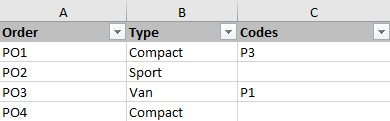
In addition, the code rules can be stored there if only certain parts are to be installed in variants of a product. The entries in the Codes column must match the code rules stored in the assembly process file. If an order has no entry in the Codes column, it is to be assumed that all parts assigned to this product will be installed. The parts that contain code rules will also be installed.
How does the calculation work?
If the three input data are all available, provision requests can be exported from ipolog 4WS. The structure of provisioning requests can be read here again.
This scheme for the structure of provisioning requests is now also used in the explanation of the structure based on an example.
The following assembly process file is used in the example:

The takt time defined for this example is 360 seconds.
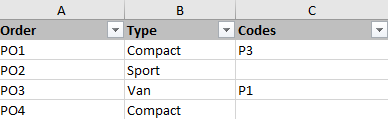
The production program contains a total of four production orders, as shown below:
Order PO1
Now the first order PO1 is considered. Compact is entered as the product in the production program. In addition, the code P3 is stored for this product.
Thus in the assembly process file in the column Product (column E) all lines must be looked for, which contain the product Compact.
In the example, these are lines 2, 4 and 5.
Line 2 and line 4 are taken into account for the calculation of the provisioning requirements.
Line 2 is taken into account because no AVO rule is defined here and therefore the material is installed in each product.
Line 4 is taken into account because AVO rule P3 is defined here. This is also defined in the production program for the product with variant P3.
Line 5 is not taken into account because a different AVO rule than the one defined is entered here.
Thus, a total of two provision requests are required for the first order, as follows:
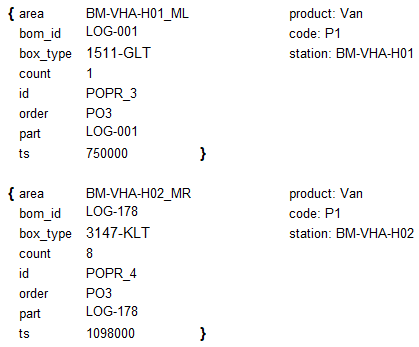
The Area corresponds to the material surface on which the part is placed.
This corresponds to BM-VHA-H01_ML for the first staging requirements.
This information is composed as follows:
Station = BM-VHA-H01 + _ + Material Area = L
This results in the designation BM-VHA-H01_ML because the area was created as a station together with the conveyor, the worker areas and the material areas when the layout was created.
Similar to the logic for the first staging request, the area BM-VHA-H02_ML is entered for the second staging request.
However, if areas are used that have been created together as a station with other areas, only the designation of the material area is to be found here (reference is made to this at the appropriate place).
The bom_id is the link to the LOG-ID in the logistic quantity structure in ipolog 4 Materialflow. How this should be structured can be defined when exporting the staging requests. In this case, the bom_id corresponds to the material number (column P).
The box_type for the staging request is stored in the assembly process file.
For the first staging request, this corresponds to 1511-GLT. This information can be taken directly from the file when searching in line 2 for the container type for the part under consideration.
In this case, the second provision request for the production order under consideration has container 6428-KLT entered.
The count describes the number of parts required for mounting in the product.
In this production order, a 1 is entered both times in the column Parts consumptionProAVO (column AJ). Therefore, the number 1 is also entered in count for both supply requirements.
At the appropriate place it is referred to again, if count deviates from the number 1.
Each supply request is assigned a unique identifier by the software directly. It is not possible to influence this. It is stored in the id entry of each provisioning request.
Order assigns the individual supply requests to the production orders.
These provision requests are assigned to the production order PO1 in this case.
In the subsequent staging requests for other production orders, the corresponding production order is then in this position. Pay attention to this once for the subsequent orders.
For part, the material that is consumed on the assembly line is entered.
For the first staging request it is LOG-001, for the second staging request LOG-179.
The last entry of each staging request is the timestamp (ts), which calculates in milliseconds from the SOP at which time the materials must be staged on the line. For the first staging request of the first production order, the timestamp corresponds to the duration defined in the Duration Max column (column J).
For the first staging request, this is 30000.
For the second and all subsequent staging requests, the takt time must also be taken into account. This now means for the second part, which is to be produced at the following station
| Cycle time | Duration Max of second staging request | ts |
| 360000 + | 18000 = | 378000 |
The second provisioning request is now called after a timestamp of 378000 milliseconds.
Thus for the calculation of the timestamp generally applies:
((Number of production order-1) * Takt time) + (Number of stations of the production order already passed through * Takt time) + (Sum of the duration of the processes already carried out at the station) + (Duration Max for the production order under consideration).
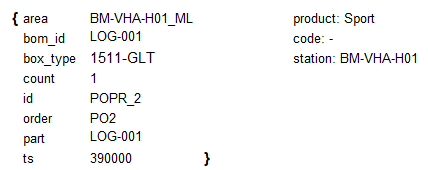
There is only one staging request for this production order. The reason for this is that in the assembly process file this product can only be found once.
The entries for area, bom_id, box_type, count, id and part are set analog to the first production order.
The order was now set to PO2, because this provision request is valid for the second production order.
The timestamp is calculated again according to the formula defined above:
((2-1) * 360000) + (0*36000)+ (0) + (30000) = 390000
Note: The units have been converted directly into milliseconds.
Order PO3
This production order applies to product Van with code 1. Two materials can be found for this.
On the one hand in line 2 the material LOG-001 and on the other hand in line 3 the material LOG-178.
The values have been set again according to the previous provision requirements.
For the entry count there is here a deviation to the already considered material staging requirements for the material LOG-178.
Instead of a part consumptionProAVO (column AJ) of 1, the number 8 is entered here. Thus, a total of 8 parts of this material are consumed at the station for this product variant. Thus a count of 8 stands with the second supply request.
The timestamp for the first staging request (material LOG-001) is calculated as follows:
((3-1) * 360000) + (0 * 360000) + (0) + (30000) = 750000
For the timestamp of the second staging request, the calculation is:
((3-1) * 360000) + (1 * 360000) + (0) + (18000) = 1098000
Order PO4
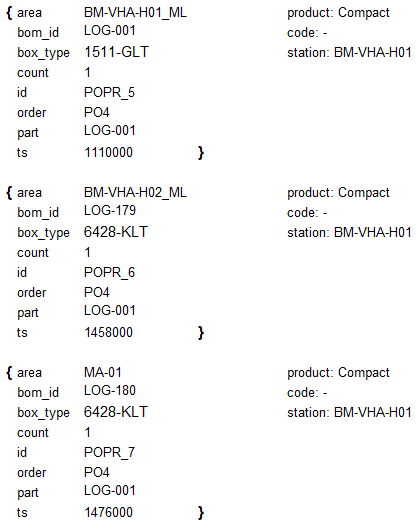
The PO4 production order does not have a code stored. Thus, all parts are installed in this product, even if a code is defined for the material at this point. As a result, this product also contains some parts more than once.
In total, there are three entries in the assembly process file for the production order: line 2, line 4 and line 5.
The provision requests are generated here again in the same way as the previously considered provision requests.
The special feature of this production order is, however, that for the material LOG-180 the material area has not been created together with a station, but separately from it. Thus with area here only MA-01 is entered.
The calculation of the timestamp is also shown here again for the individual staging requests of this production order.
Provision request 1:
((4-1) * 360000) + (0 * 360000) + (0) + (30000) = 1110000
Provisioning requirement 2:
((4-1) * 360000) + (1 * 360000) + (0) + (18000) = 1458000
Provisioning requirement 3:
((4-1) * 360000) + (1 * 360000) + (18000) + (18000) = 1476000