

If you as a user want to export your planning data as Excel - after planning the supply chain - so that you can share your current planning data with planning colleagues, use the "Export Logistics Quantity Framework" function.
1. Next to the button "Importing Logistics Quantity Framework XLS" is a second button called "Exporting Logistics Quantity Framework XLS". By clicking that button a xlsx-file is created. Before this a save dialog opens in which you can select the destination of the export file. The changeable default name of the export file in the save dialog is:
yyyyy-mm-dd_hh-mm-ss_ipolog_LMG_projectname
e.g. 2019-05-07_10:10:52_IPO.Log_LMG_Siah-testproject_Export LMG
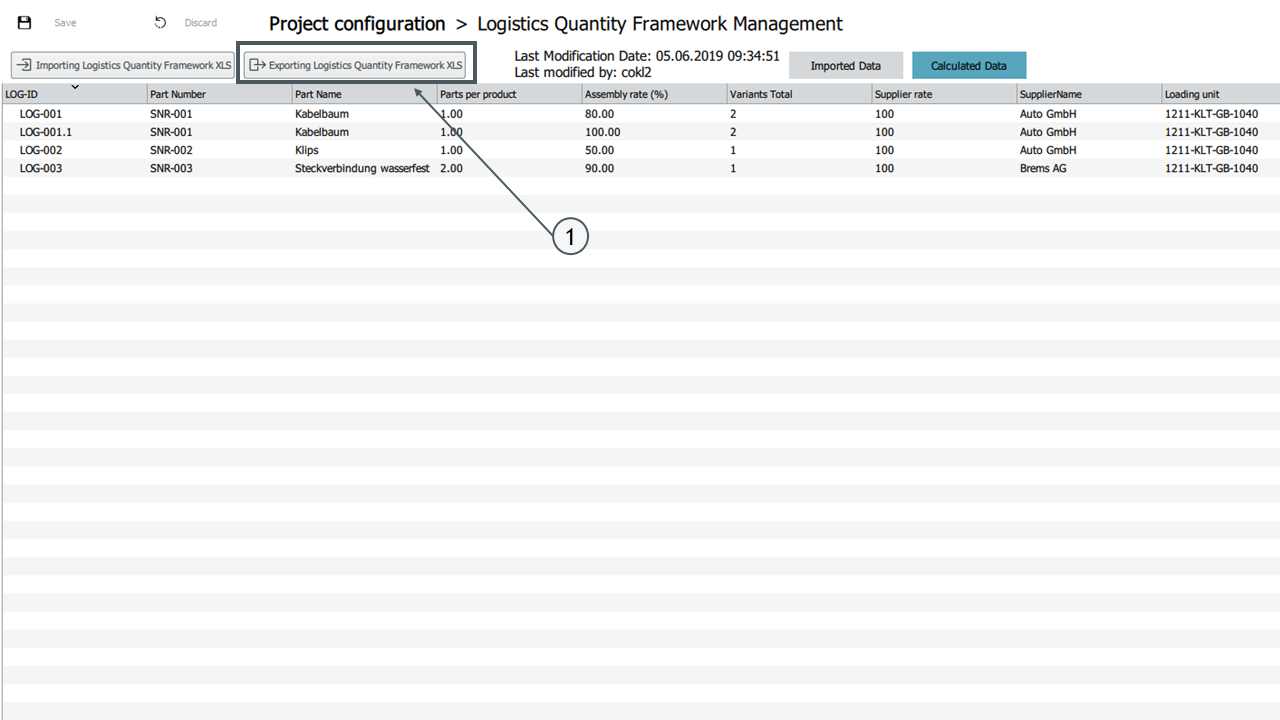
The exported Logistics Quantity Framework contains the following information:
| Information in each column | |
|---|---|
| LOG-ID | |
| Part Group | |
| Part Number | |
| Part Name | |
| Parts per Product | |
| Assembly Rate [%] | |
| Number of Variants | |
| Supplier rate [%] | |
| Supplier | |
| Loading Unit-ID | |
| Loading Unit-Name | |
| Loading Unit Length [mm] | |
| Loading Unit Width [mm] | |
| Loading Unit Heigth [mm] | |
| Parts per Loading Unit | |
| Loading Unit Stacking Factor | |
| Load Carrier ID | |
| Load Carrier Name | |
| Load Carrier Type | |
| Load Carrier Length [mm] | |
| Load Carrier Width [mm] | |
| Load Carrier Heigth [mm] | |
| Load Carrier Stacking Factor | |
| Load Carrier per Loading Unit | |
| Parts per Load Carrier | |
| Grouping Chain Name | |
| Grouping Load Carrier ID | |
| Grouping Load Carrier Name | |
| Grouping Load Carrier | |
| Grouping Load Carrier Length [mm] | |
| Grouping Load Carrier Width [mm] | |
| Grouping Load Carrier Height [mm] | |
| Number of Compartments per Grouping Load Carrier | |
| Grouping Loading Unit ID | |
| Grouping Loading Unit Name | |
| Grouping Loading Unit Length [mm] | |
| Grouping Loading Unit Width [mm] | |
| Grouping Loading Unit Height [mm] | |
| Number of Grouping Load Carriers per Grouping Loading Unit | |
| Default Supply Chain Name | |
| Delivery Type Inbound | |
| Station | |
| Material Area 10 | |
| Material Area 10 disposal chain | |
| Material Area 9 | |
| Material Area 9 disposal chain | |
| Material Area 8 | |
| Material Area 8 disposal chain | |
| Material Area 7 | |
| Material Area 7 disposal chain | |
| Material Area 6 | |
| Material Area 6 disposal chain | |
| Material Area 5 | |
| Material Area 5 disposal chain | |
| Material Area 4 | |
| Material Area 4 disposal chain | |
| Material Area 3 | |
| Material Area 3 disposal chain | |
| Material Area 2 | |
| Material Area 2 disposal chain | |
| Material Area 1 | |
| Material Area 1 disposal chain | |
| Custom Column 1 | |
| Custom Column 2 | |
| Custom Column 3 | |
| Custom Column 4 | |
| Custom Column 5 | |
| Custom Column 6 | |
| Custom Column 7 | |
| Custom Column 8 | |
| Custom Column 9 | |
| Custom Column 10 | |
| Custom Column 11 | |
| Custom Column 12 | |
| Custom Column 13 | |
| Custom Column 14 | |
| Custom Column 15 | |
| Custom Column 16 | |
| Custom Column 17 | |
| Custom Column 18 | |
| Custom Column 19 | |
| Custom Column 20 | |
| Custom Column 21 | |
| Custom Column 22 | |
| Custom Column 23 | |
| Custom Column 24 | |
| Custom Column 25 |