

-
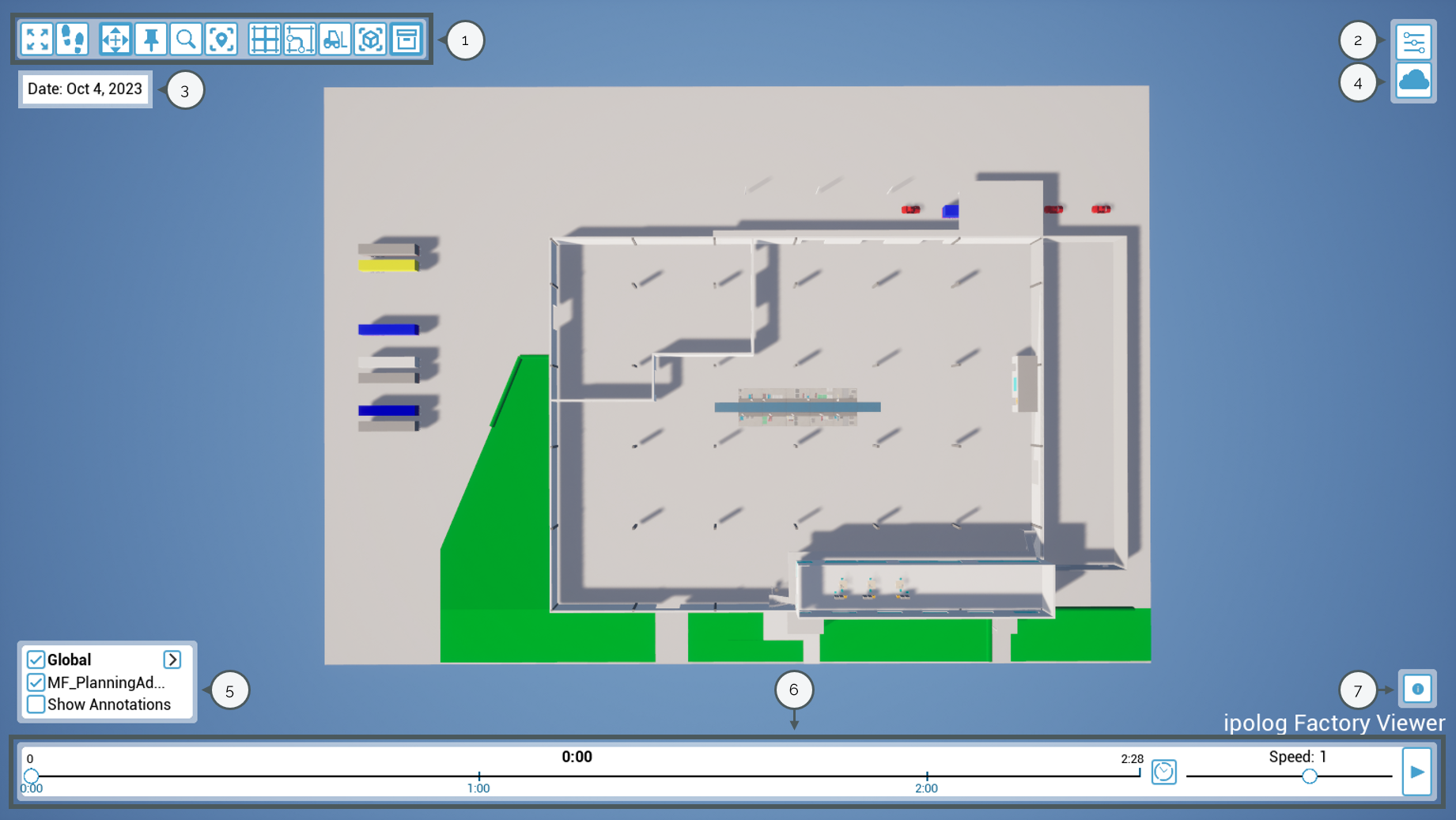
Module bar: All modules for operating ipolog Factory Viewer are located here. Find out more.
-
Settings: Graphic settings and privacy settings can be adjusted here. You will also find the version number of ipolog Factory Viewer. Find out more.
-
Date: The simulation date is displayed here. This is based on the selected simulation day in ipolog 4 Material Flow.
Please note: Simulations from ipolog 4 Workspace are not marked with a date.
-
Server connection: By clicking on the "cloud"-symbol, you can edit access data for your own servers and switch between projects. Find out more.
-
Display settings: In addition to the modules in the module bar, facilities, workers, areas and products can also be shown and hidden here.
-
Animation control: The animation control can be used to adjust the simulation speed, jump to a specific point in the animation and start and pause the simulation. By selecting the “clock” symbol, you can jump to a specific point in time.
-
Information window: Relevant information is displayed here, e.g. if transport data needs to be recalculated.