

If an incorrect font isdisplayed in the 3D view of ipolog 4 Workspace, the cause may lie in the graphics settings.
First check whether your graphics drivers are all up-to-date. If this does not solve the problem, follow the instructions below (Windows 11):
Instructions
-
Open the folder in which you have installed ipolog 4 Workspace
-
Navigate to the file “ipolog_4_WS.exe”
-
Right-click on the file and then “Show more options”
-
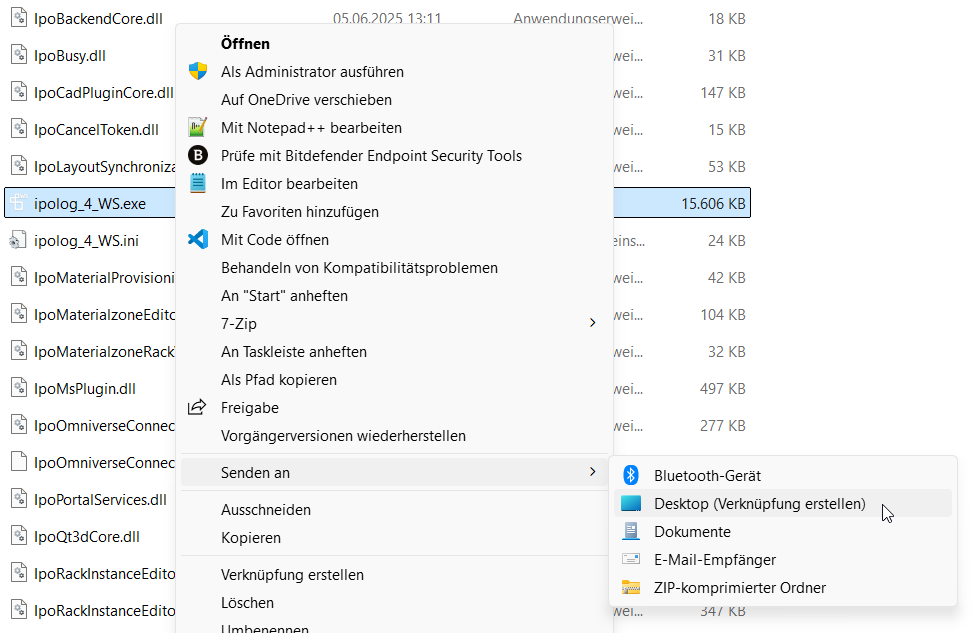
“Send to” > “Desktop (Create Shortcut)”:
-
Navigate to the shortcut that was created on the desktop. This should be called “ipolog_4_WS.exe - Shortcut”
-
Right-click on the file and then “Properties”
-
Enter “-notextures” after the path to ipolog in the “Target” field:
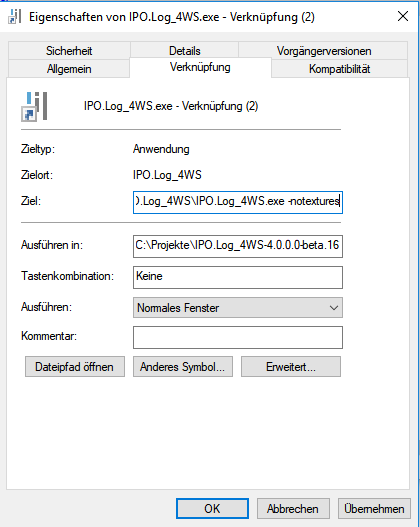
Then select “Apply” and start ipolog as usual.