

The reports available in the File menu of ipolog 4 Workspace allow you to export various data records and evaluations of your project. We will go into this in more detail in this article.
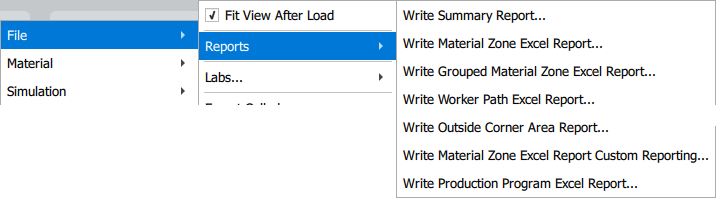
| Write Summary Report... | Creates a summarized data set from a chart for the time-distance evaluation for workers, worker workload, material placement on areas and material placement on the outside corner - both including racks. |
| Write Material Zone Excel Report... | Creates a detailed overview of the utilization and material placement on each area, rack and station in your project. |
| Write Grouped Material Zone Excel Report... | Creates a detailed overview of the utilization and material placement on each area, rack and station in your project. Connected areas, which are assigned to a station, are visualized together in a spreadsheet. An image of the 2D view of your project is also provided. |
| Write Worker Path Excel Report... | Outputs a data record including a graphic visualization that shows the worker routes and time utilization in detail. |
| Write Outside Corner Area Report... | Creates a data record for material placement on the Outside Corner. |
| Write Material Zone Excel Excel Report Custom Reporting... | Creates a detailed overview of the utilization and material placement on each area, rack and station in your project. This can be customized beforehand, for example with your company logo. |
| Write Diff Excel Report... | before Version 4.4.7 |
| Write Production Program Excel Report... | Creates a detailed overview of the currently selected Production Program. |