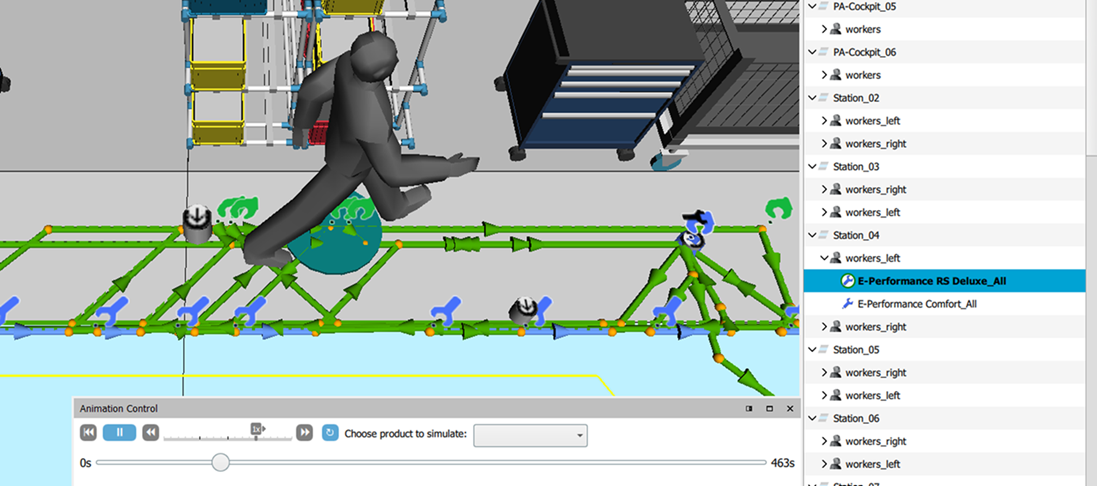
The filter set offers the possibility to select different areas in a scenario, search for them and then simulate them if necessary.
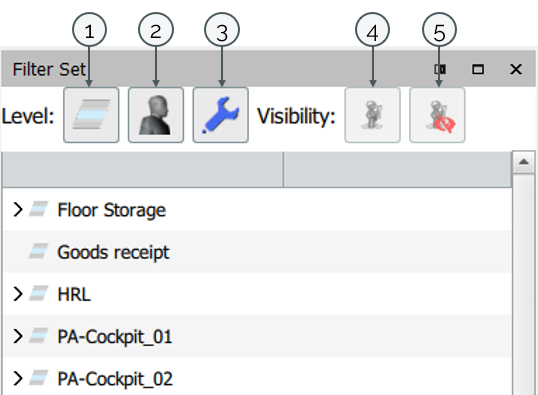
| 1 | Station | The Filter Set opens at the level "Station". |
| 2 | Worker | The Button "Worker" shows the workers per work location (workerpoints). When selecting the worker, the walking path is calculated. By double-clicking, the view is zoomed to the worker. It is also possible to select several workers at the same time. |
| 3 | Product | The Button "Product" displays another drop down in the filter set. The products that are assigned to the worker are displayed. When you select a product, the worker's route for the product is calculated. |
| 4 | Show Worker | "Visibility" is about Show/Hide the Worker. "Show Worker" is showing the Worker in the Simulation and its worker path. |
| 5 | Hide Worker | With "Hide Worker" the worker can be hidden. This becomes visible with a red mark in the filter set. |
As before, simulations are started via the Animation Control
No product needs to be selected if the worker(s) are selected in the filter set.