

The portal offers the possibility to compare different ipolog 4 Material Flow scenarios. An overview of the scenarios is available here.
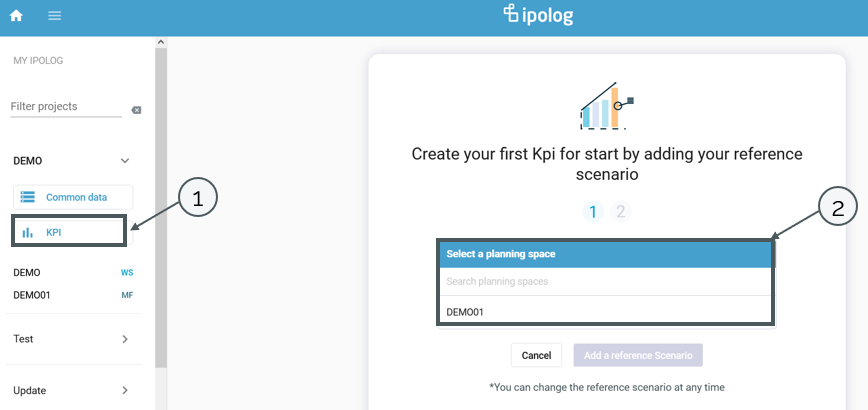
To compare scenarios, after selecting a project, there is a button on the left side with the label "KPI" (1). With a click on the button a view opens, in which a reference scenario can be selected. For this purpose, the planning state from which the scenarios are to be compared must first be selected (2).
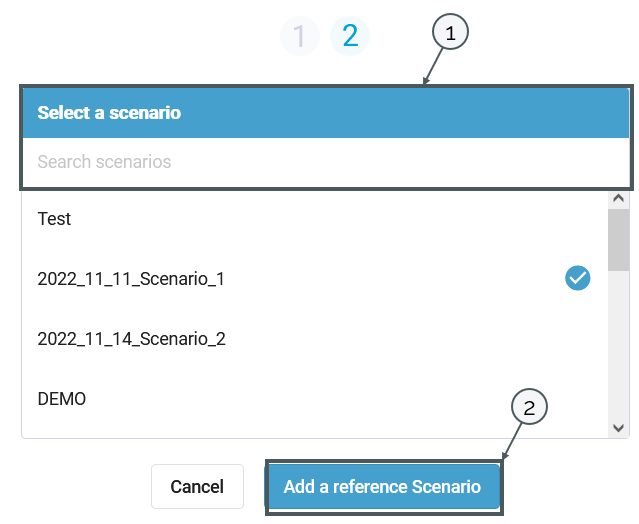
After selecting the planning state, a scenario can be selected (1). Finally, the scenario can be added via Add a reference Scenario (2).
In the view, the scenario can be removed via the three dots (1) or additional scenarios can be added via the plus (2).

Einzelne Kennzahlen können über den Pfeil (1) ein- und ausgeblendet werden.
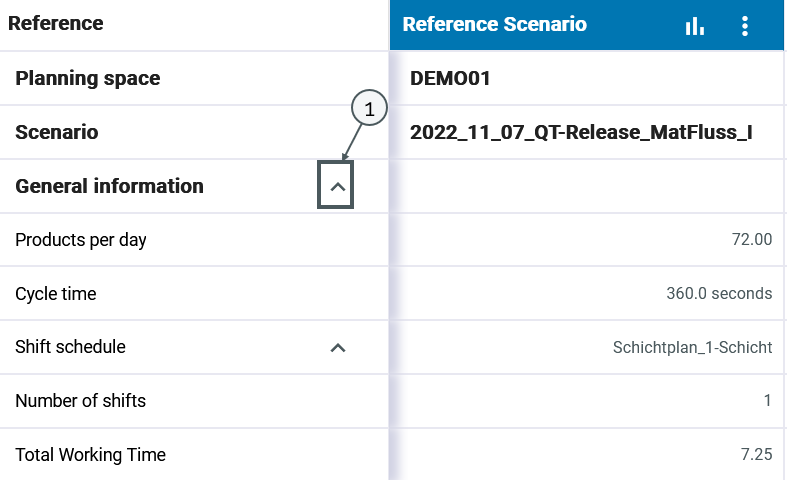
An overview of the planning key figures can be found here.
Export of scenario comparison
The KPI comparison can be exported via the "Export scenarios" button (see 1).

All values displayed in the comparison and their differences for the reference and comparison scenarios are exported and saved as an Excel table.