

To create a new planning space in your scenario, first select the scenario and then "+ Create Planning Space" in the upper right corner of the scenario view:

A pop-up window opens in which you can specify whether you want to create a workspace or Material Flow planning space. Here you can also define a title [1], a start date [2] and a short description [3] for the planning space. You can further assign a ruleset [4] and one or more stations [5] to the planning area - this allows you to divide individual areas of your project into separate planning spaces.
Please note:In order to work with the imported part data in your planning space, you need to select the corresponding material areas and stations here.
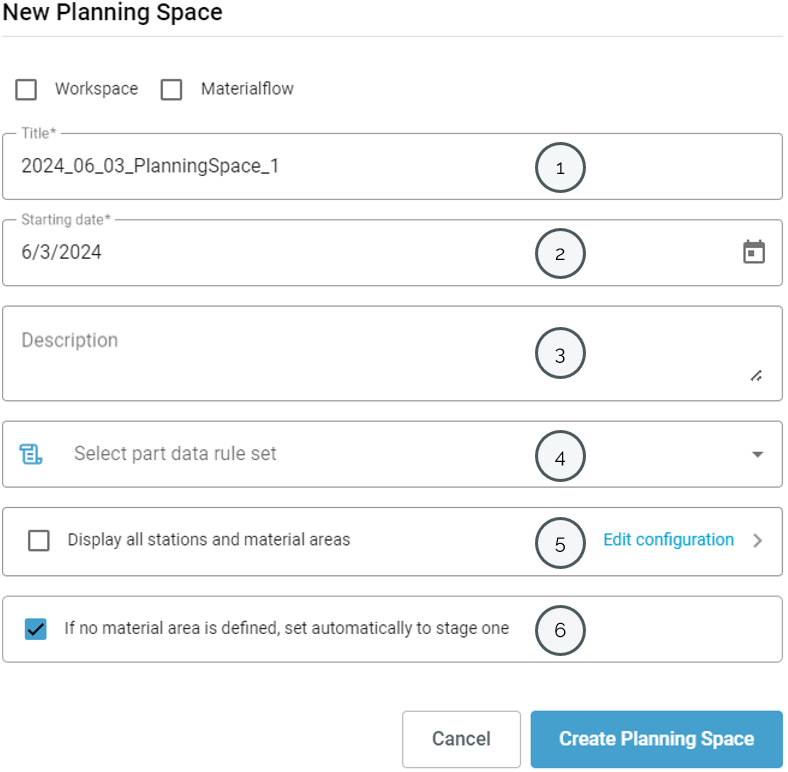
To assign the stations, you first have to select the corresponding stations from your project during import. Further information here.
Via "Edit configuration" [5], you can then select the desired stations and material areas to be displayed in the planning space:
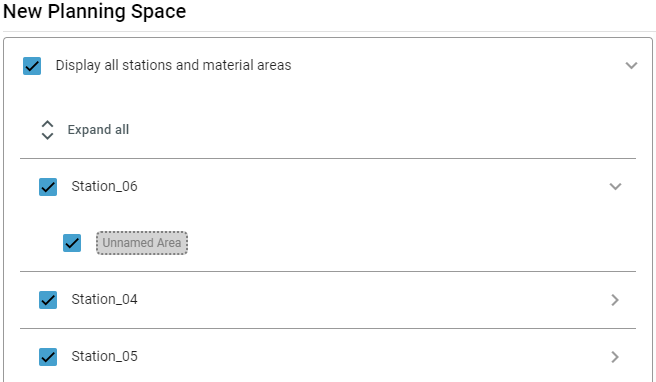
Stations that are not assigned to a material area can be automatically set to stage 1 by selecting option [6].