

In the Scenario Admin, you can initiate all imports/exports that are relevant for processing your scenario between Workspace and Material Flow. This includes, for example, the layout, assembly processes, production programs or provisioning requirements.
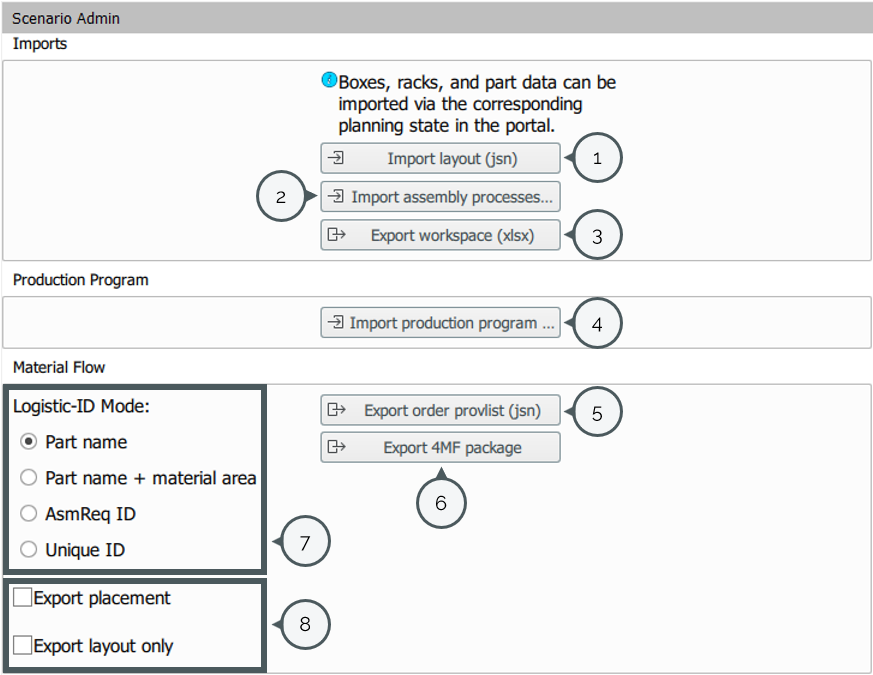
| 1 | Here you can import the layout as a jsn file. Important note: - the name of the .jsn file must not contain umlauts - the path must not contain umlauts. |
| 2 | Here the processes can be imported as an .xls-file. The structure of the file can be found here: Workspace Excel. |
| 3 | The Workspace Excel can be exported as .xlsx-file here. |
| 4 | The Production Program can be imported here. The production program must then be activated via "View -> Production program". Further information about the Production Program can be found here. |
| 5 | The provisioning requirements can be exported here. |
| 6 | Here the ipolog 4MF package can be exported in order to import the data into ipolog 4 Material Flow. Further information about exporting only the layout is found here. |
| 7 | Here you can decide how the provision requirements (5) are to be exported. It should be noted that the Logistic-ID Mode must match the LOG-ID in the Logistic Quantity Structure. Further information on this can be found here. |
| 8 | Settings for the export of (6) can be made here, so the placement or only the layout can be exported. |