

In order to create a shift plan, a .csv file is also used as a basis or the format .csv must be selected when saving an Excel spreadsheet.
A shift plan should be structured as follows:
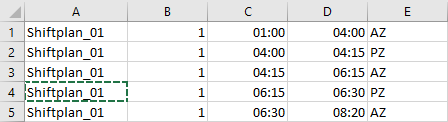
| Column | Content | Description | Format in Excel |
| A | Shift model | Different shift models can be imported into the software. Therefore, the shift model must be entered in this column. | Standard |
| B | Shift | Within a shift model there can be different shifts. You must always enter a specific name or number of the shift in the column for the respective shift, for example, enter 1 for the first shift of the day. | Standard |
| C | Start of a period of a shift | The start time of a shift or a shift segment can be found in column C. The start time is entered as time in the notation hh:mm, e.g. 06:00 for shift start six o'clock in the morning. | Standard |
| D | End of a period of a shift | The end time of a shift or a shift segment has to be entered in column D. It is defined in the same way as the start time. The notation is also the same as for the shift start, i.e. 09:00 for nine o'clock in the morning. | Standard |
| E | Type | This column classifies whether the time segment of a shift is working time or break time. To do this, you enter AZ for working time and PZ for break time. | Standard |